

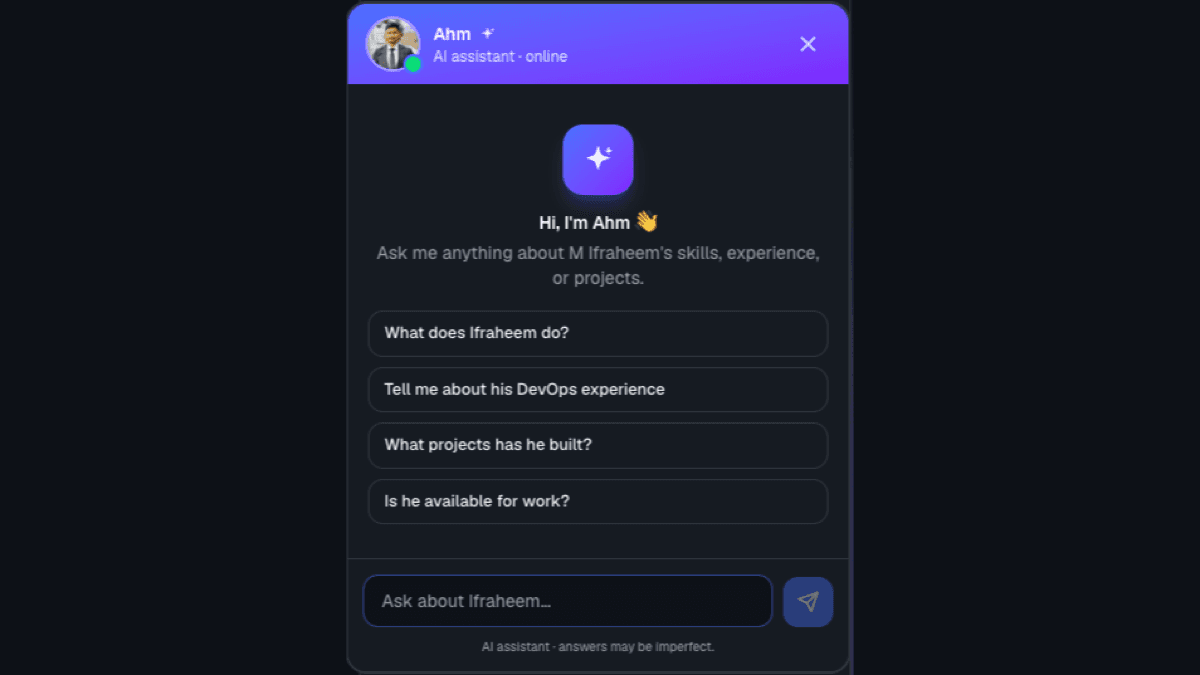
Short answer: The AI assistant on this site is a streaming chatbot built with a Next.js route handler. It answers questions about my work using a system prompt grounded in real site data, runs on a hybrid Groq + OpenRouter setup that fails over automatically, and captures leads to my inbox when a visitor wants to get in touch — all behind guardrails and per-IP rate limiting.
What does the assistant actually do?
It's the chat bubble in the corner of every page. A visitor can ask about my experience, skills, or projects and get a short, conversational answer. If they're interested in working together, it collects their details and emails them to me — turning a passive portfolio into something that can start a conversation and capture a lead 24/7.
How do you give an AI agent accurate context about you?
The key to stopping an LLM from making things up is grounding. Instead of hoping the model "knows" me, the server builds a system prompt from the same data that renders the site — profile, skills, experience, and projects. Because it's generated from the real data files, it never drifts from what the pages say. The prompt also sets guardrails: only discuss my work, and politely decline anything unrelated. Grounded context plus guardrails is what keeps the answers correct.
How do you stream AI responses in Next.js?
Responses stream token-by-token so the reply appears instantly instead of after a long pause. The chat lives in a Next.js App Router route handler (app/api/chat/route.ts) that calls the model with stream: true, parses the provider's server-sent events, and re-emits the text through a ReadableStream. The browser reads that stream and appends each chunk to the message as it arrives — no extra SDK required.
Why a hybrid Groq + OpenRouter setup?
Free LLM tiers get rate-limited, and individual models get retired. Relying on one provider means the assistant breaks the moment that provider is busy. The fix is a fallback chain across providers: because Groq, OpenRouter, and xAI all speak the same OpenAI-compatible API, one loop can try them in order and use the first that responds. Any provider without an API key is skipped automatically.
| Groq (primary) | OpenRouter (fallback) | |
|---|---|---|
| Speed | Very fast (custom hardware) | Varies by model |
| Free tier | Generous, no card | Free :free models, often rate-limited |
| Reliability | High | Model IDs change; used as backup |
Groq handles the vast majority of traffic (it's fast and its free limits are generous), and OpenRouter's free models silently take over on the rare occasion Groq is busy — the visitor never notices a hiccup.
How does the lead capture work?
When a visitor shows intent to get in touch, the assistant collects their name, email, and what they need, one question at a time. Once it has everything, it replies with a warm confirmation and appends a hidden structured block at the end of its message. The client strips that block out of the chat so the visitor never sees it, parses the JSON, and posts it to a second route handler that emails the lead to me via Resend. A passive contact form becomes a guided conversation that qualifies and forwards the lead automatically.
How do you keep it from being abused?
Two layers. First, the guardrails in the system prompt keep the assistant on-topic and prevent it from answering unrelated questions or leaking its instructions. Second, server-side rate limiting caps requests per IP (both the chat and the lead endpoint), so nobody can spam the model or flood my inbox. Client-side limits are trivial to bypass, so the limiting lives in the API routes where it can't be skipped.
Conclusion
An AI assistant turns a static portfolio into something interactive: it answers questions in my voice, stays accurate by being grounded in real data, stays online through provider fail-over, and captures leads without me lifting a finger. The whole thing runs on free tiers and a few Next.js route handlers.
Want to see it in action? Open the chat bubble in the corner and ask it anything about my work — or read how I approach backend architecture.